Apple - Project Hummingbird
Apple needed an agentic system to help aggregate data to push creativity in event creation.
The client team brought me in to make something flashy within Apple's branding to get them past the RFP stage and into the orals.
This project was made on a rapid prototyping team, rather than through traditional user-centric design. These are sales-centric tools*. Success is measured by winning the work, not by traditional success metrics.
*I like to call this dumb design for dollars.
Situation
A week out from an RFP deadline, a client team came to us with low expectations. They weren't sure what they needed or how it should work. They just knew one piece of a large Apple RFP was about how Apple plans events.
Apple doesn't throw events for the hell of it. Every one is backed by market research, government policy, competitive research and interviews, and that purpose has to stay clear through every stage of the event and every team working on it. An in-store event for young creatives might tie back to a news story and a shift in government policy. As planning gets going, PR, comms and events all need the same thread to work from.
Apple has access to all of that data. What they didn't have was a way to pull it together and turn it into something meaningful.
Task
First conversation focus
The ask: an event planning application, on a very short turnaround. We got about half an hour with the team before we had to get to work, so we spent it asking questions. What were they looking for? How should it look and feel?
Where do we go from here?
With no one else to validate against on day one, my project manager and I validated with each other. We agreed it was an event planning app that brought teams together and pushed the idea creatively, with team availability, communication between teams, and real scheduling for meetings and each part of the event. The output: one platform for all of the planning. (Spoiler: it wasn't.)
Action
Claude as a research partner
With no time to spare, I had Claude pull as much of Apple's documentation, color and typography as it could find. Apple documents its design really well, especially in the developer portal. I also had it pull everything on Liquid Glass, since that was my shot at something flashy that still matched where Apple's design is right now.
The front door
The first pass was all about the front door: a chat-first intake for new projects, in Apple's style. I spent a good chunk of time on an assistant visualization that felt on brand for Apple but still its own thing. Not Siri's orb, and not anything anyone else was using.
After a few rounds I landed on a field of little spikes that reacts as you type. I wanted it to feel like data points and noise flowing through the system, and the input bar, where you shape your idea, to feel like it was catching signal out of that noise.
Polish up front, gray boxes behind
I didn't want to build pages before they were defined, so I split the work in two. One small, focused area got the real treatment: polished UI, plus a live LLM connection so I could actually talk to the chatbot and get smart answers back (no training yet). That got the look approved.
Everything else started as text. I wrote out each page's structure, flow and features, then had those turned into blocked-out wireframes, just gray boxes, right inside the working app. It let me find out fast that I was super wrong about what needed to be made.
Four days, three directions
Every check-in pulled the project somewhere new. That happens a lot with RFPs: different leaders each grab for their piece of the pie, and each wants the parts they own to get funded.
Day 1: Not an event planner
A brand-new senior leader and our primary client told us we were off track. This wasn't an event planning app. Since my wireframes were so high level, tossing that scope was easy. The visuals were approved as they were. They loved the flash and polish, they just wanted the scope dialed way back.
Day 2: A new leader, a new focus
Another senior leader joined, focused on technical considerations and how technical writing would happen in the app. Less to throw out this time, and because of how I'd built things, I could move phases from wireframe to hi-fi fast.
Day 3: The real problem
I still didn't feel like we'd landed on one idea, so I got a call with just my client. That's where it clicked. They needed to pull in a ton of data, find what's relevant, and draw connections. Then take that concept and push it creatively: the format, the audience, who's in the room, the creative. Less about planning the event, more about one narrative across every workstream.
Day 4: Locked in
We finally locked in, with a presentation that really landed with the team. Back on track.
Real data, simulated sources
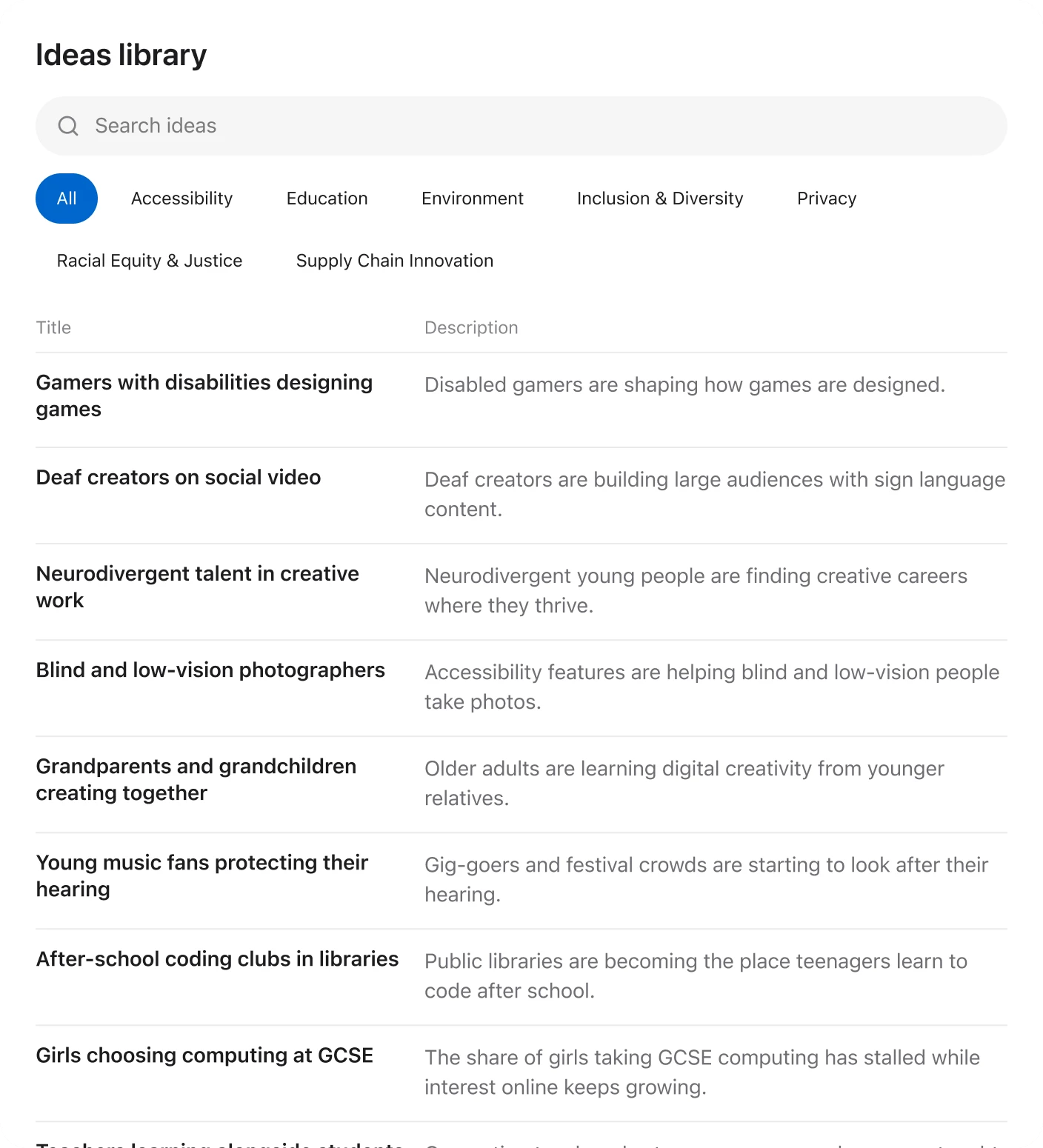
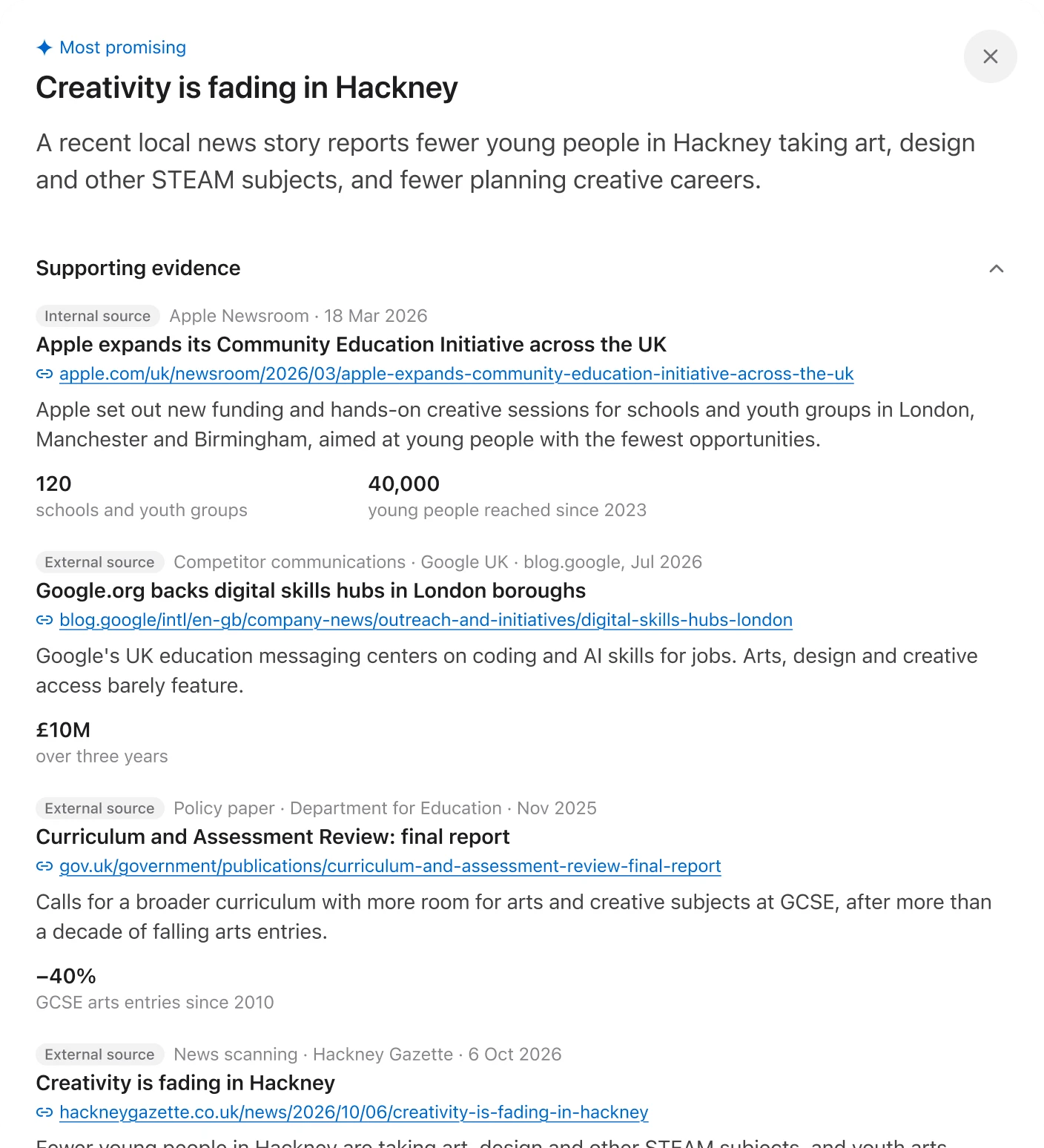
Here's the kind of connection the system had to make. A government policy paper says the focus should be the arts for kids. A news story says creative literacy is dropping. Apple values creativity and has a new product to launch. Put together, that's your market moment, and the app should say so.
To find those moments, it parses everything for connecting threads:
- Government policy papers
- News events
- Competitive research
- Market research
- Social research
- Research with real people, through interviews and surveys
- Fixed sources like Apple's core shareholder values
Some of it was real: Apple's shareholder values came straight from the web and went into the UI and the bot's training. The rest, like policy papers, market research and interviews, was simulated for the demo.
Trust me or guide me
We never got much time on who would actually use this. With a pitch like this there's always some ambiguity about who the users are, what their roles are and what they need most, so I had to make some assumptions.
Some users would be absolute veterans. They spot market moments on their own and have a finger on the pulse, but they still need evidence to back it up. Others might be an intern spinning up on a new project who needs a lot more help getting from a market moment to something smart. The amount of pushback and suggestion the agent should give those two people is wildly different.
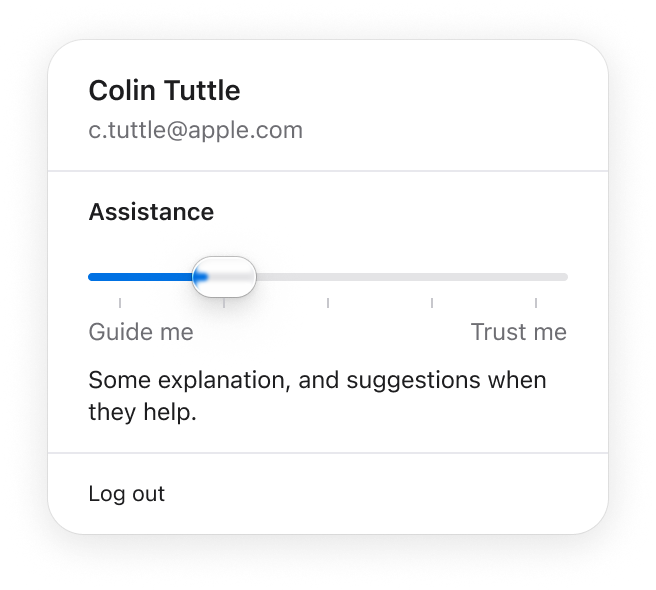
I felt it myself while testing. I wanted to follow one idea through every phase, and it kept throwing suggestions at me. Too wordy. I kept wishing for a super-user mode. So I built a slider for how much help the assistant gives you: a Liquid Glass slider with set stops between Guide me and Trust me, labels that felt like something Apple would ship.
I put it under the user menu so it reads as a personal setting, and so my name is literally in the app if it ever lands in front of Apple designers. I also hid a prompt: ask who designed it, and it tells you it was made by Deloitte, with me as the product designer. Always be hustlin', my dudes.
Creative Concierge
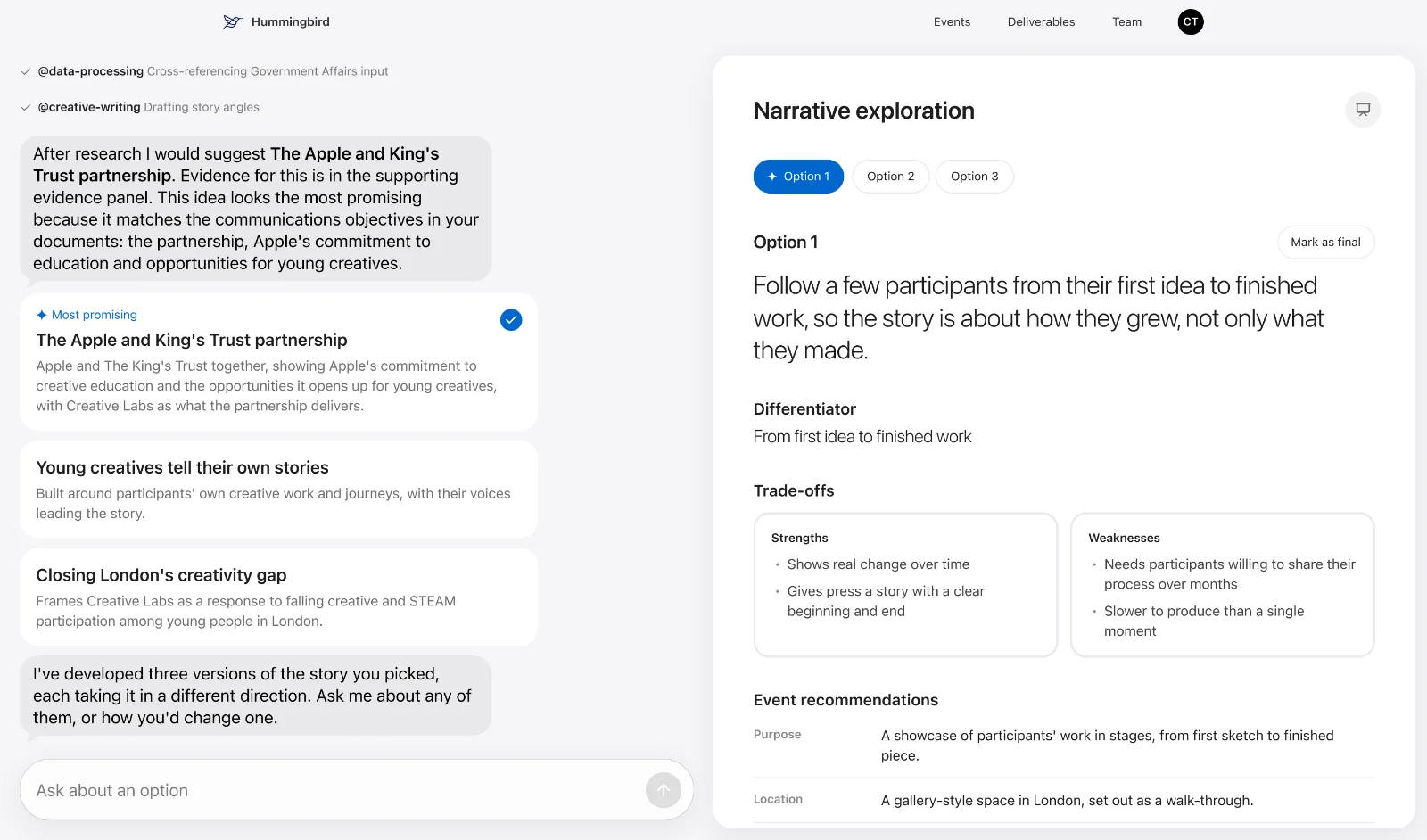
Getting from a market moment to an event worth showing up for takes more than a summary. This is where the assistant earns its keep.
Send it to the chat
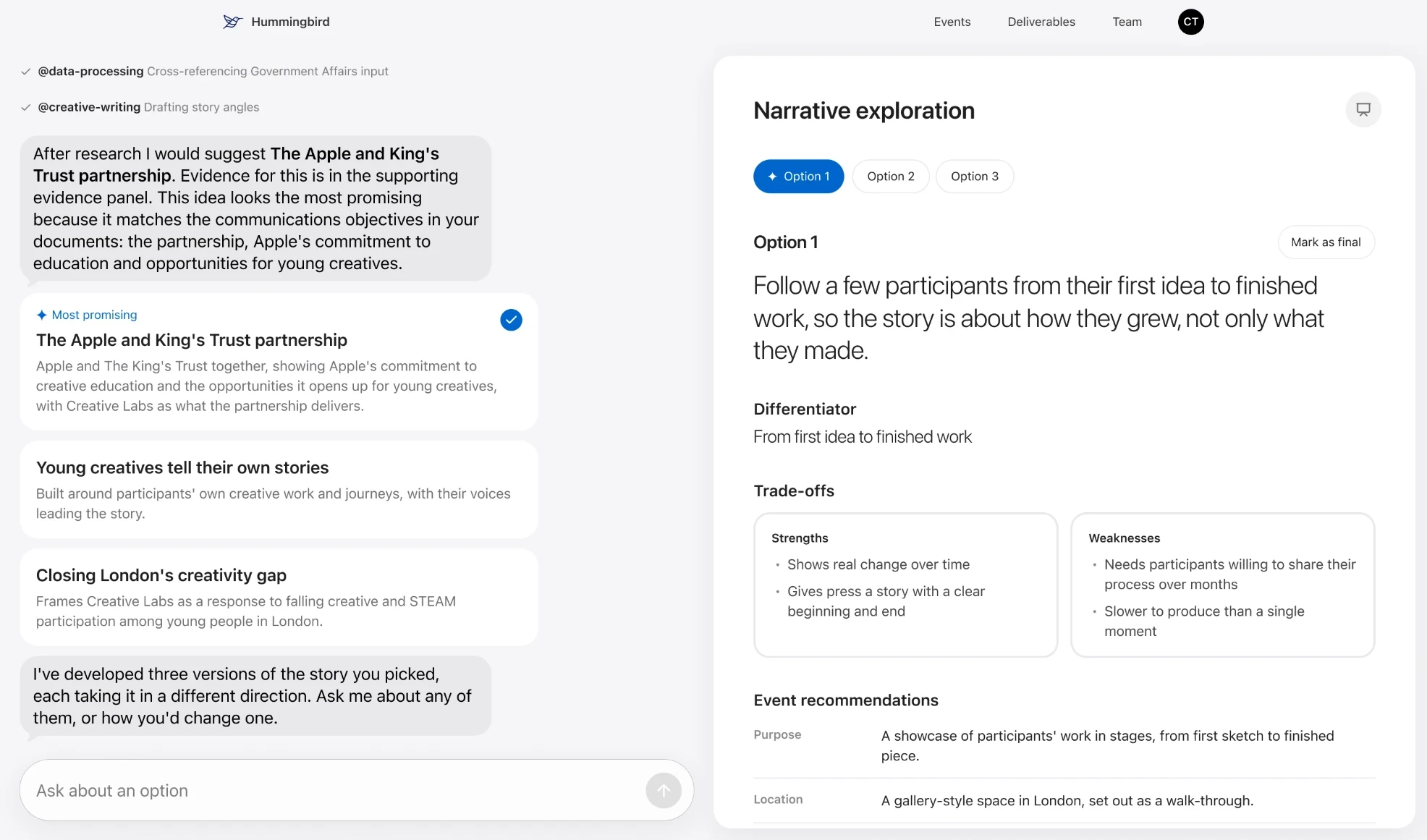
Every phase spells out what you can and can't edit. The event details are all yours to change. Things like trade-offs aren't, since they're read from the event as it takes shape.
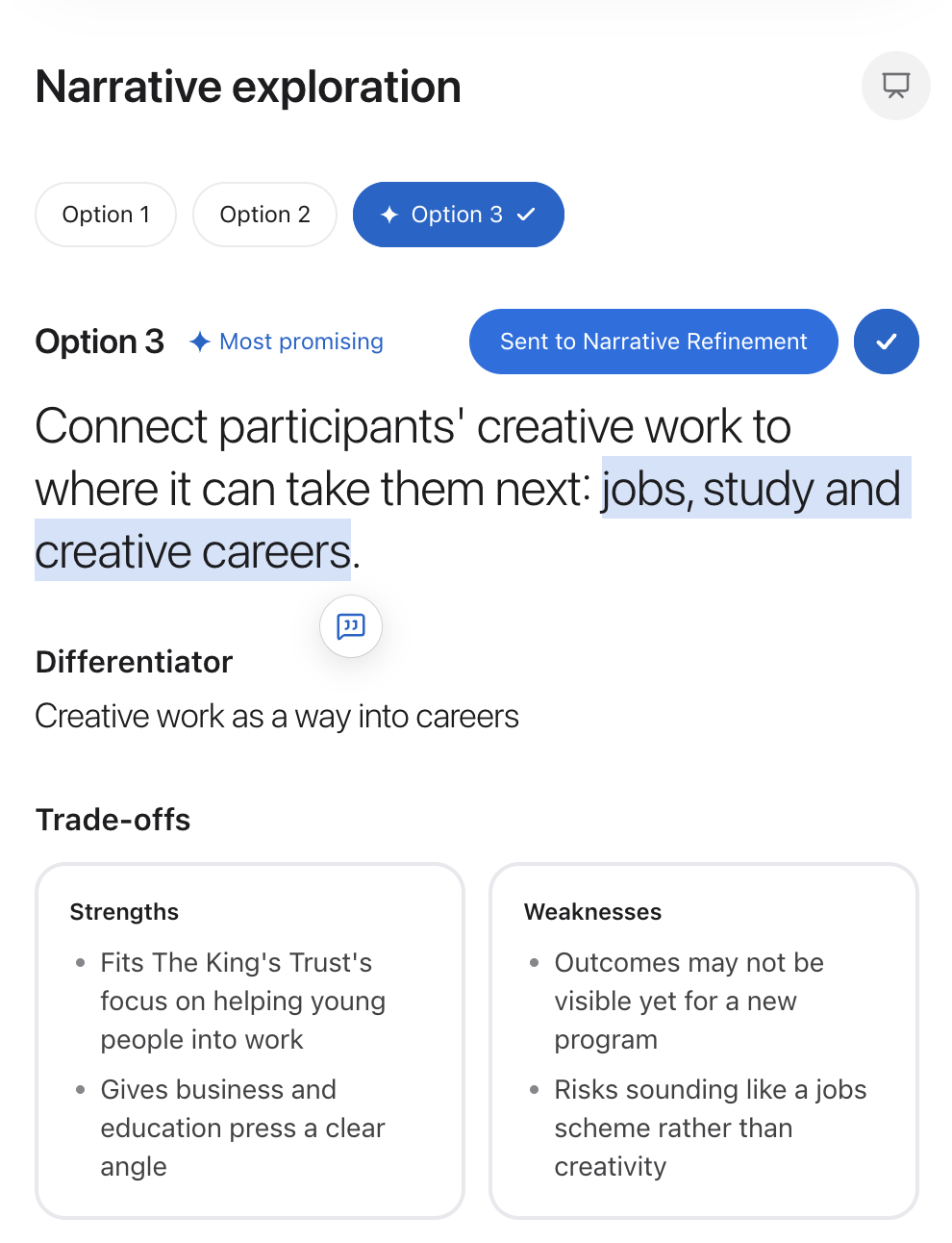
Instead of making every little piece editable, you work with the chat. Select any text in the right-hand panel, send it to the chat, and ask for whatever change you want. It kept the interface really clean and opened the door to some fun stuff.
Agents with a job description
Behind the chat, agents with defined jobs, like creative writing and research, pick up the work. Ask for a big change and it goes back to the evidence to see what actually supports it. And when an idea could be more creative, it pushes back and tells you how.
The clown test
My go-to test on the Guide me side: add clowns to the event. Every time. Clowns aren't the craziest thing to have at an event, but to a human they're a very odd choice. Machines tend to shrug: it's a party, it's an event, clowns, sure.
Clowns were my way of checking whether the assistant would think critically about whether they make sense for this event.
Less weird testing was just asking the agent for advice: what would make some part of this event more compelling, or more appropriate?
Result
Going in, I was sure I'd be working long nights and the weekend. The plan was Monday to Friday, and I figured I'd need Saturday and Sunday to have it ready for Monday. Instead, with polished UI approved up front and wireframe-style pages to approve the workflows, I could do a lot of work, throw a lot of it out, and still hit every deadline. I presented Thursday and Friday with very little feedback.
Late in the project there was some hesitation about handing over a working tool, even behind a password. The happy medium was a 2-minute teaser video, made right in Replit, showing the app working and hitting its key moments. It fit their under-2-minute presentation and went in with the RFP.
The RFP was downselected, and the app is headed to orals, presented in person to Apple at their Cupertino headquarters. One step closer to a sale. And I didn't work the weekend, which made my wife happy and got me more time with the kiddo.
5 days
start to finish
100%
weekend work avoided
1
app won a spot in orals
Reflection
Wireframes in code first
Make one piece high-end for approval, then build everything else in the working live app, wireframe-style. It saves tokens, saves time, and lets you rough things in fast, to get approved or get thrown out. It's a new approach for me and I'm not sure it's completely sound yet, but I'm repeating it. I'm doing it right now on my next project.
A design system the agent can follow
I built this after Hummingbird, for that next project: a library of design system docs Replit reads before it builds anything.
The design choice that matters most is the one-way flow. Values live only in the core and foundation files, and components point back to them. Changing a token in one file updates it everywhere.
Orchestration layer
Scope, product rules, task routing, checks before done
Always loaded
Core
- Typography type scale
- Color tokens, contrast
- Motion springs, curves
Loaded by task
Foundations
- Layout 4px grid, radii
- Surfaces shadows, Liquid Glass
- Accessibility reduced motion, keyboard
- Responsive breakpoints
- Icons and copy icons, interface copy
Never loaded
Notes
- Audit log, team only
Referenced by
Components
- Home and composer
- Chat
- Controls
- Panels